
Oxford ELSA.

Oxford English Language Spotlight Australia

An online English proficiency test for students aged 10–17 applying to leading Australian schools.

Measure reading, listening, writing and speaking skills with an internationally benchmarked assessment.

Oxford ELSA.

Oxford English Language Spotlight Australia

An online English proficiency test for students aged 10–17 applying to leading Australian schools.

Measure reading, listening, writing and speaking skills with an internationally benchmarked assessment.

Online Test, On-demand

CEFR aligned A2–C1

Live Speaking Test

Results within 48 hours

What is Oxford ELSA?

A trusted English language assessment for school entry in Australia

Designed with engaging, age-appropriate content, Oxford ELSA provides a supportive testing experience that helps students perform at their best. The adaptive test adjusts to each student’s ability, delivering an accurate assessment of English proficiency aligned to the Common European Framework of Reference for Languages (CEFR) from A2 to C1.

The Writing component is marked by qualified examiners, while the Speaking component is conducted live online with an experienced examiner, ensuring a reliable and authentic assessment of communication skills.

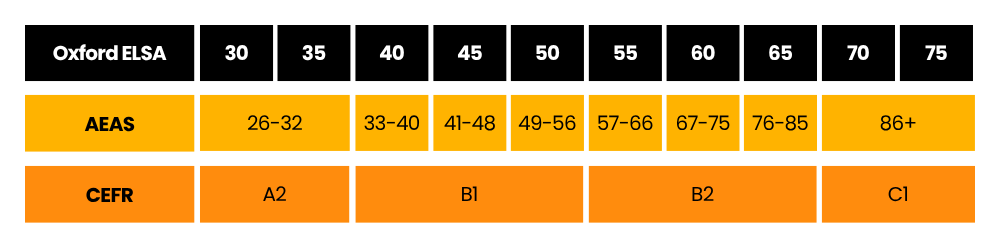
Oxford ELSA also maps directly to both CEFR and AEAS levels, making it easy for schools and education providers to understand a student’s English proficiency and support informed admission decisions.

What's included?

Reading

Adaptive online test with 20 questions

25 Minutes

Listening

Adaptive online test with 20 questions

25 Minutes

Writing

Two written tasks assessed by qualified examiners

30 Minutes

Speaking

Online interview featuring three unique tasks with a live examiner

15 Minutes

Accepted by participating schools

Oxford ELSA is accepted by the following schools for English language assessment:

If you’re applying to either school, Oxford ELSA provides an easy and convenient way to demonstrate your English language proficiency.

How to complete your Oxford ELSA

1

Register for your test

Complete the registration form with your details and verify your account. As part of the registration process, you will be required to upload a copy of your passport. Once your registration is complete, log in to the Oxford ELLT Portal to begin your test journey.

2

Purchase your test licence

Click Get Started to purchase your Oxford ELSA test licence through the secure payment portal.

3

Complete your online assessment

Complete the Reading, Listening and Writing components online from home through the secure Oxford ELLT Portal. You can complete these components in any order.

4

Book your Speaking Test

Select a convenient time for your live online Speaking assessment with a qualified examiner and attend your session via the secure Oxford ELLT Portal.

5

Receive your results

Once all test components have been completed and assessed, you'll receive your overall English language proficiency result and a detailed performance report within 48 hours.

Why choose Oxford ELSA?

Designed for students

Age-appropriate topics and engaging tasks for students aged 10–17.

Adaptive

Adaptive testing that adjusts in real time, delivering fast, precise, and personalised assessment for every learner.

On-demand

Our on-demand platform lets learners complete ELSA whenever it’s convenient, offering reliable assessments with complete flexibility.

Accessible

Adaptive testing that adjusts in real time, delivering fast, precise, and personalised assessment for every learner.

Secure

Adaptive testing that adjusts in real time, delivering fast, precise, and personalised assessment for every learner.

Test Security

The Oxford ELLT Portal offers state-of-the-art security features to ensure every candidate completes their test under the right conditions, following all test rules. Oxford ELLSA uses hybrid proctoring, combining advanced recording technology with expert human review for a seamless, secure testing experience.

Test Requirements

Before taking Oxford ELSA, please ensure you meet the following requirements:

Computer

Use a desktop or laptop computer that meets the minimum specifications:

Windows PC

  • Windows 10 or later
  • Minimum 2.33 GHz processor
  • At least 4 GB RAM

Mac

  • macOS 10.7 or later
  • Minimum 2.33 GHz processor
  • At least 4 GB RAM


Important:

  • Ensure your device is plugged into a power source or fully charged before starting the test.
  • Do not use a mobile phone or tablet.

Webcam

Use either a built-in camera or an external webcam.

Internet Browser

Use the latest version of one of the following browsers:

  • Google Chrome
  • Microsoft Edge
  • 360 Secure Browser

Internet Connection

Use a stable internet connection with at least 5 Mbps download and 5 Mbps upload speed.

Passport and ID Varification

As part of the registration process, you will be required to upload a copy of your passport.

Before the start of each test component, including the Speaking test with a live examiner, you will also be required to complete an ID verification check.

During each ID check, you must present the original passport that you uploaded during registration. Photocopies, scanned copies, or photographs of your passport will not be accepted.

AI Assistance and Web Apps

Before starting the test:

  • Close all AI assistance tools.
  • Close any automatic translation software.
  • Close any unnecessary web browser applications or extensions.

Wired In-Ear Earphones

For the Listening and Speaking test:

  • Use wired in-ear earphones with a built-in microphone.
  • Do not use Bluetooth headphones.
  • Do not use earphones during any other test components.

Frequently Asked Questions

Reading and Listening each take around 25 minutes, Writing approximately 30 minutes, and the Speaking test around 15 minutes.

Yes. Oxford ELSA is completed online through the secure Oxford ELLT Portal.

Yes. The Speaking component is conducted live via video with a qualified examiner.

Oxford ELSA measures English proficiency from CEFR A2 to C1.

Please get in touch with The Oxford ELLT Team: [email protected]. A member of the team will be able to reset your password.

In order to update details such as your email address, Passport Number, University, picture of myself, or passport copy, please contact us at [email protected]. Explain which information you want to update on the portal and inform us of your details (full name and passport number).

No, you must use a laptop or desktop computer with a camera for your speaking exam. You cannot complete the speaking assessment on a mobile phone.

No, we need to see your original passport during the speaking exam and upon registration.

Ready to take the Oxford ELSA?

Book your test today and complete your English language assessment online.